Start with the meal you remember.
Type “chicken bowl with rice, salsa, cheese, and half left” instead of searching duplicate entries. The no-database calorie tracker guide explains when that workflow helps.
 Mori
Get Mori
Mori
Get Mori
Mori is an AI calorie counter for iPhone that works from a sentence. Tell it what you ate in plain language, skip the food database hunt, then review editable protein, carbs, fat, and calorie estimates.
No database hunt
Conversation first
Macros stay legible
Every estimate is editable
History becomes visual
The right starting point depends on what broke down: memory, portions, trust in an estimate, protein visibility, or the app workflow itself. Pick the closest problem and start there.
Decide where after-midnight food belongs, mark incomplete days honestly, and keep late entries from turning into a missed week.
Choose the logging day AI reviewCheck macro math, portions, oil, sauces, drinks, toppings, label basis, and editability before saving the number.
Review the estimate Protein focusSee when a protein-first log is enough, when calories still matter, and how to keep the habit from becoming a scoreboard.
Use the lighter protein workflow Protein app choiceChoose protein-only tracking, macro context, label-first logging, saved meals, or a lighter journal before installing another app.
Check protein app fit App choiceCompare text, photo, voice, barcode, database search, privacy comfort, and subscription friction with five real test meals.
Check your app fitMori is for people who want useful calorie and macro context without turning every meal into a database search project.
Type “chicken bowl with rice, salsa, cheese, and half left” instead of searching duplicate entries. The no-database calorie tracker guide explains when that workflow helps.
AI can miss oil, sauce, brands, cooked weight, and portions. Mori keeps the first estimate editable. Use the AI calorie estimate checker to compare macro math and hidden extras, then read the AI macro tracking guide for the deeper review order.
Text is not always the answer. Barcode, photo, voice, or a verified database can be better for some meals. Use the calorie tracker app fit checker before downloading another app.
Mori turns the way you naturally describe food into a journal you can trust, understand, and correct.
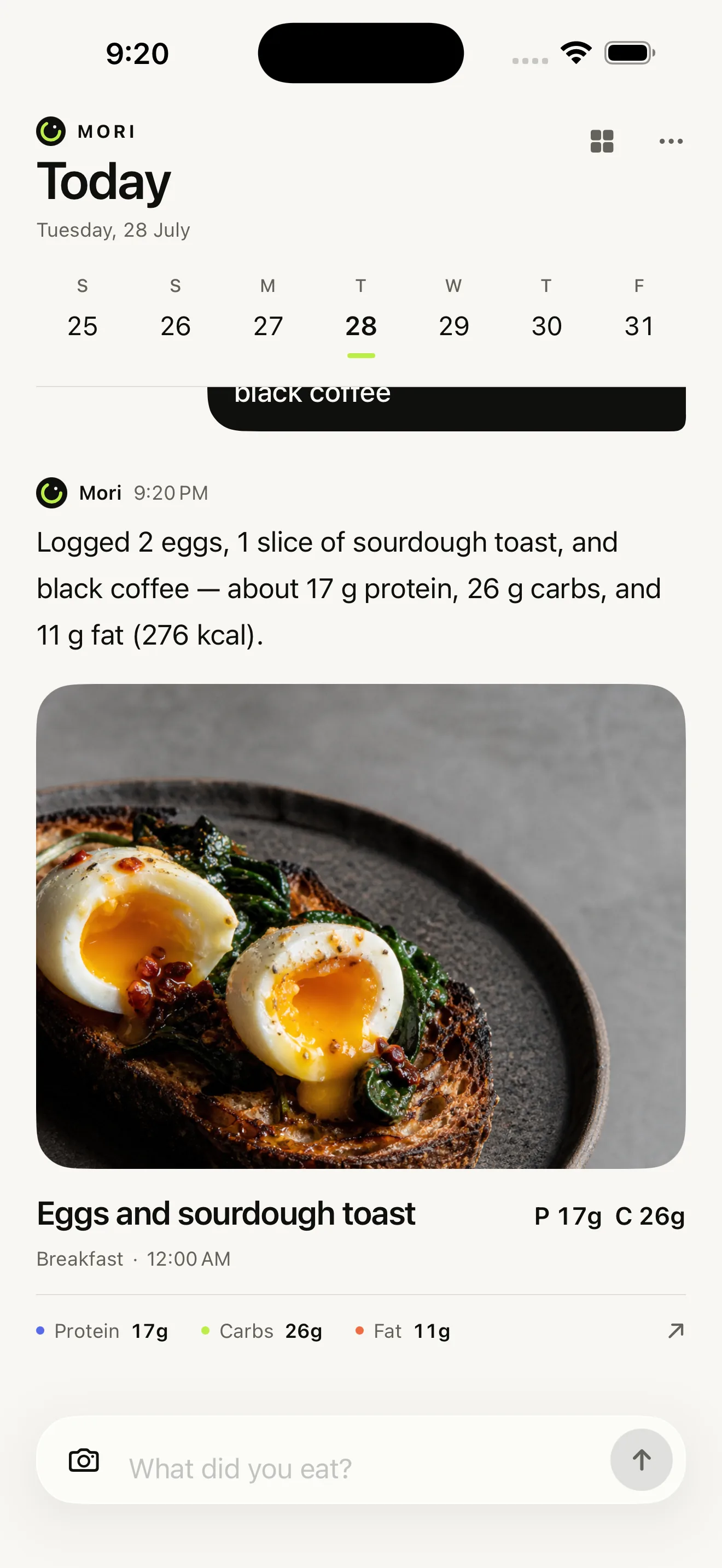
Two eggs, sourdough toast, and a black coffee.

Logged: 17g protein, 26g carbs, and 11g fat.
No database syntax. No exact product hunt. Describe the meal like you would to a training partner.
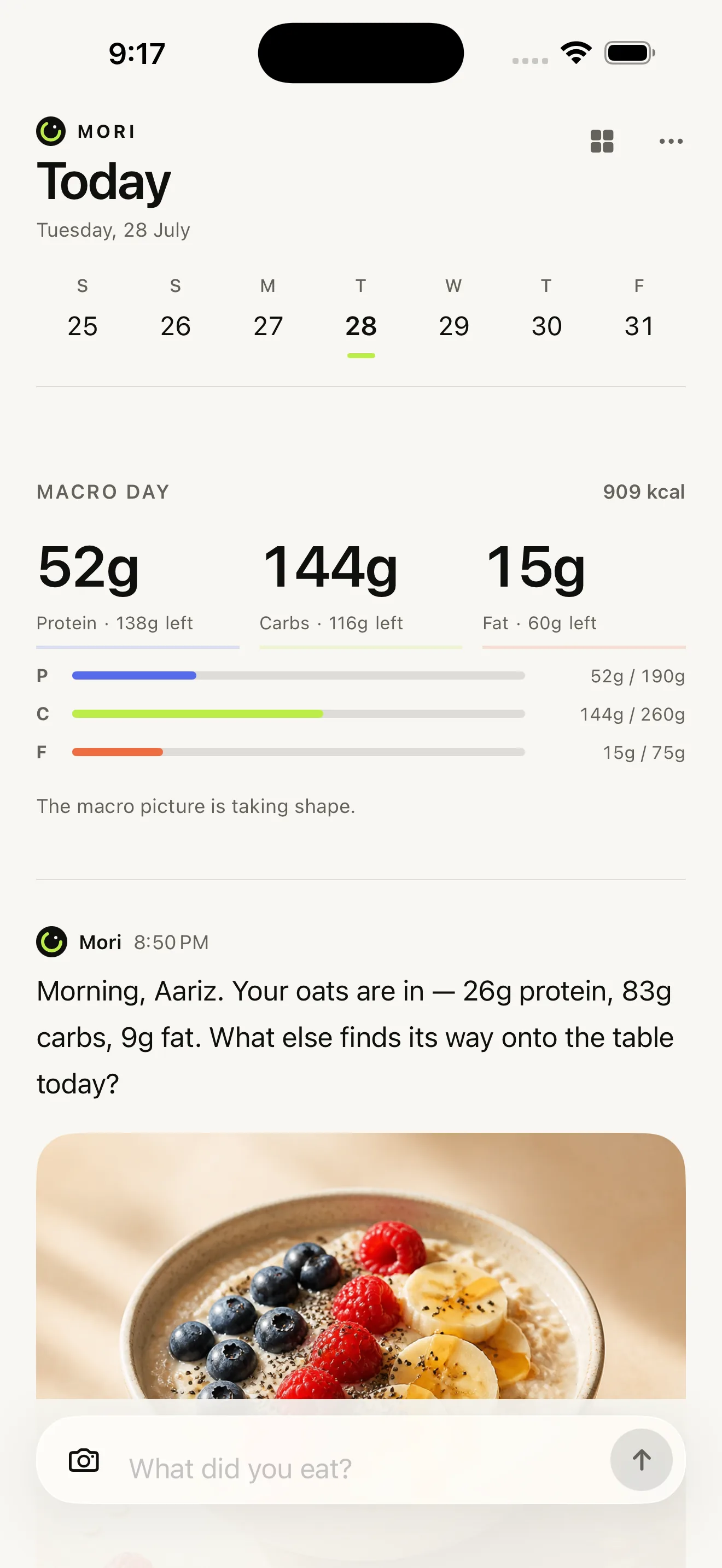
Protein, carbs, and fat lead. Calories stay available as useful context, without taking over the whole experience.
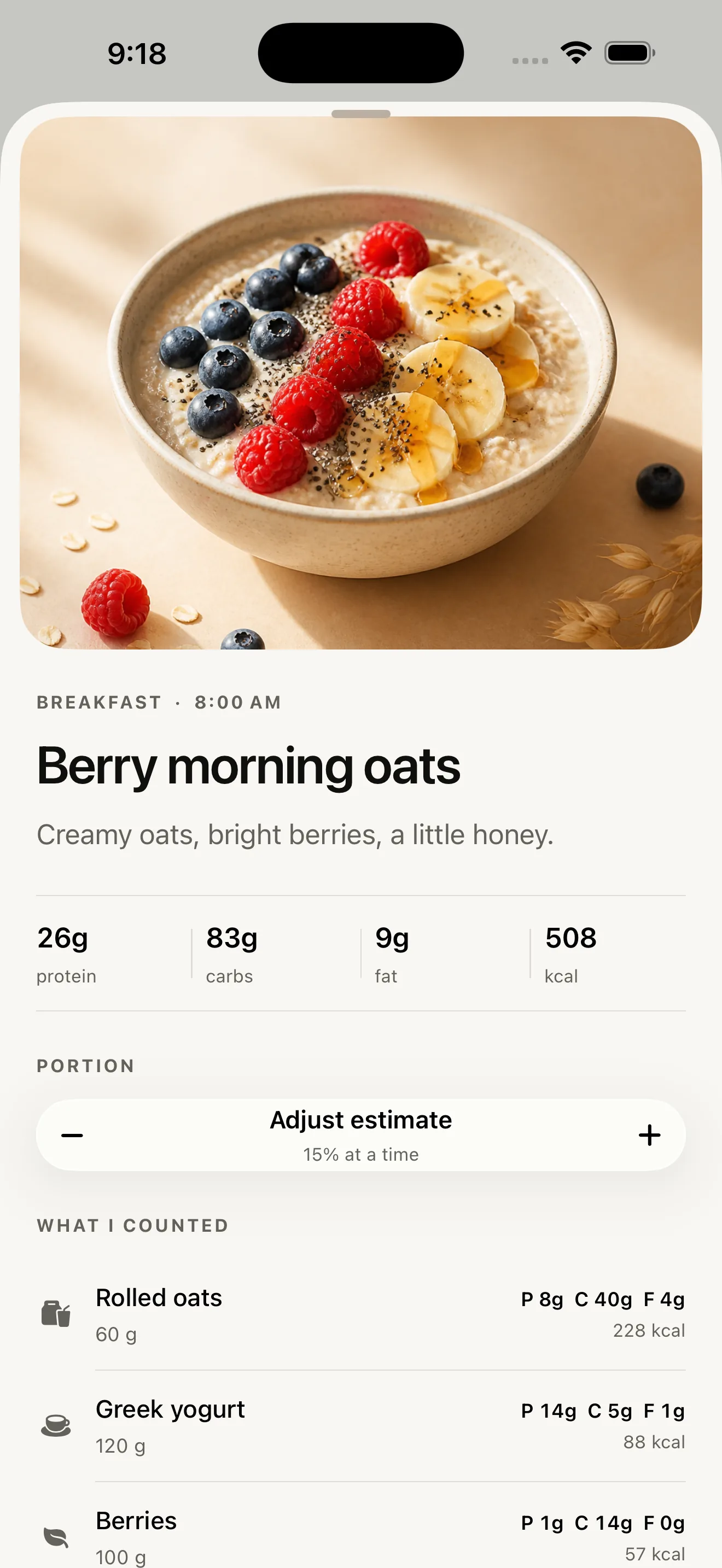
Correct portions or ingredients whenever Mori’s first guess does not match the plate in front of you.
Food rarely arrives as a perfect database entry. Mori starts with your words, gives you useful context, and leaves the final say with you.
Mori’s first estimate
Two eggs, sourdough toast, and a black coffee.
The estimates stay legible. The experience stays calm enough to use every day.
Protein, carbs, and fat sit at the center of the day. Progress is readable at a glance, with calories in their proper place.
Portions, ingredients, and nutrition estimates remain under your control.
No “good” foods.
No “bad” foods.
Just useful context.
Mori avoids moral labels and spreadsheet energy. It helps you see the day clearly, then lets you move on.
Pull back from the daily thread and meals become a visual atlas, an image-led record that is easier to scan, remember, and return to.
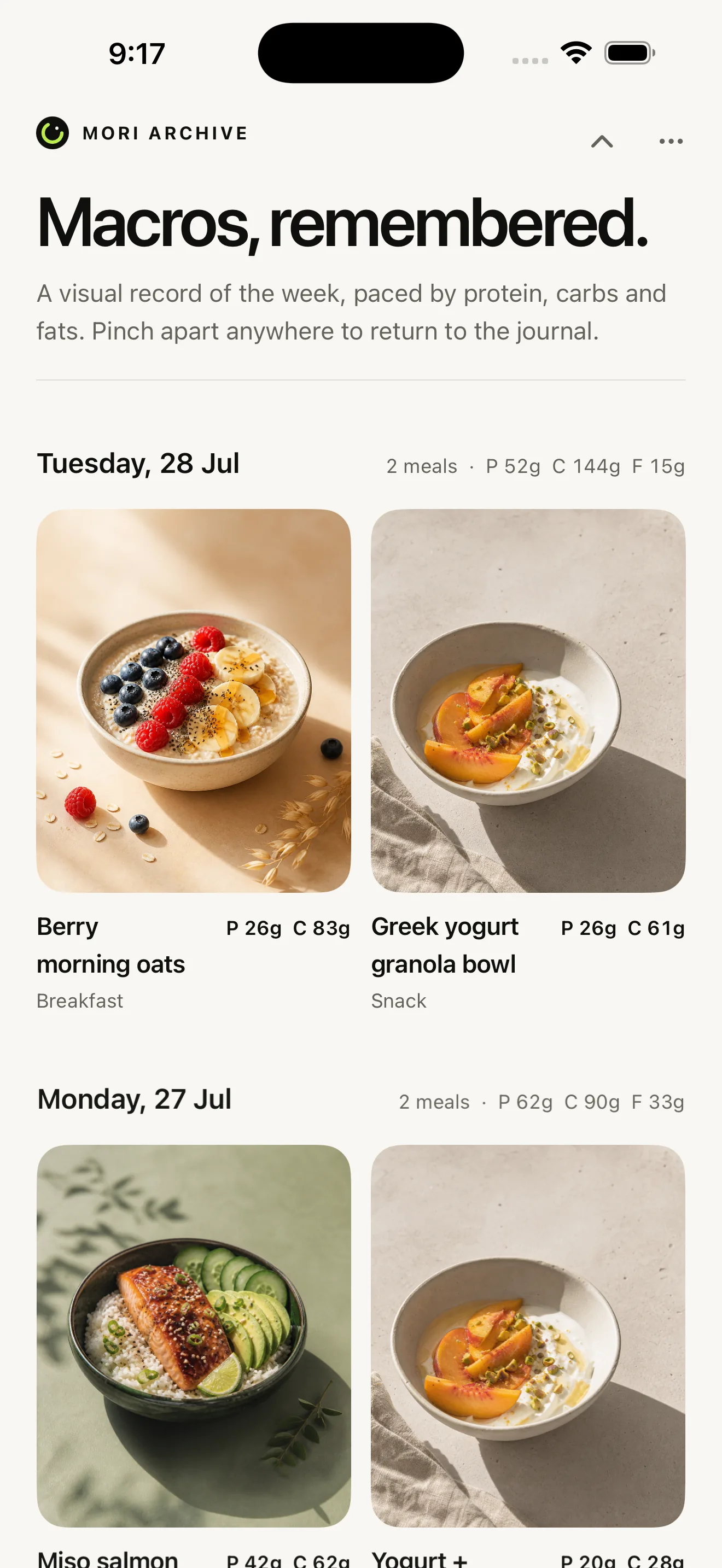
From a plain-language meal to an editable card and a visual week, the real Mori experience in thirty seconds.
Clear guides and free calculators for the questions that show up between meals.
Log what you already eat for a week before changing anything, weigh only the dense foods, then set a target from your own baseline.
Read the starting guide Maintenance caloriesWhere the formula comes from, why the activity category moves the number so much, and how to treat the result as a starting assumption.
Read the maintenance guide TDEE calculatorMifflin-St Jeor resting energy plus an activity assumption, with the nearby category range so one dropdown click does not look like a fact.
Estimate TDEE Observed maintenanceUse 14 to 28 days of intake and a weight trend to see the maintenance your data implies, then compare it with the formula estimate.
Compare the two 100 calories in gramsEnter calories per 100g from a label and see how many grams equal 100 Calories, 50 Calories, 200 Calories, or your own target.
Calculate grams for 100 Calories Calories per gramSee calories per gram, calories per 100g, and grams per 100 Calories so apples, rice, nuts, oil, and packaged snacks are easier to compare.
Compare calorie density kJ to CaloriesDivide by 4.184 for kcal, then scale a per-100g or per-serving value to the amount you actually ate.
Convert kilojoules Daily kJEstimate daily energy in kJ, compare it with Calories, and keep the Australian or New Zealand label basis visible before logging.
Estimate daily kilojoules Ounces to gramsSwitch between ounces and grams for solid food weights, keep fluid ounces out of the math, and scale the nutrition entry cleanly.
Convert food weight Protein per 100 CaloriesCompare foods by protein per 100 Calories and protein share of total calories, then copy a clearer Mori log note.
Compare protein density Cooking oilGrams, teaspoons, spray oil, measured pan leftovers, and servings, so a home-cooked batch does not quietly drift.
Calculate cooking oil Recipe macrosAdd ingredients, oil, and toppings, then divide by servings or by cooked weight when the portions are uneven.
Calculate recipe macros AI estimate guideSee where portion and hidden-ingredient errors enter, then use a quick review order before accepting the result.
Review AI estimates AI estimate checkerCompare AI calories with macro math, then review portion, oil, sauce, drinks, toppings, labels, and uncertainty.
Open the estimate checker AI accuracy testCompare an AI estimate with a corrected or weighed reference and see the gap before reusing it as a repeat meal.
Test the estimate Photo estimate reviewCheck a photo app or chatbot estimate for portion depth, hidden oil, sauce, mixed meals, and macro consistency.
Review the photo estimate ChatGPT caloriesBuild a prompt that asks for assumptions, ranges, hidden ingredients, and a copyable Mori log sentence.
Build the prompt AI meal promptsUse portion, preparation, oil, sauce, label, restaurant, and uncertainty details before saving an AI estimate.
Write a better meal log iPhone app choiceCompare photo, text, voice, barcode, pricing, privacy, and editable estimates before downloading another tracker.
Read the app checklist Protein app choiceTest whether you need protein-only logging, macro context, labels, saved meals, or a lighter journal.
Run the protein fit checker Food scale shortcutTurn one measured breakfast, bowl, coffee, or meal-prep lunch into a reusable Mori entry.
Save a repeat meal Text-first loggingUse meal-description examples, AI estimate review steps, and barcode/database fallback rules before choosing a text-based tracker.
Read the text-based guide Travel loggingChoose full logging, rough estimates, a protein anchor, or a clean pause before the trip gets messy.
Plan the trip log Weekend auditCompare weekdays with weekends and check restaurants, drinks, snacks, late nights, and missing logs.
Audit the weekend Food log recoveryLog the day, compare the weekly context, avoid harsh compensation, and restart at the next meal.
Recover calmly Plateau troubleshootingAudit log completeness, scale averages, restaurant estimates, water-weight context, and maintenance assumptions.
Troubleshoot the plateau No-database loggingUse meal examples, edit checks, and app-fit questions for AI or text logging without scrolling duplicate entries.
Read the no-database guide Free toolsConvert macros to calories, resize a portion, or see an evidence-labeled protein range.
Open the calculators Repeat breakfastCalculate oats, yogurt, milk, protein powder, fruit, seeds, and toppings once, then edit the parts that change.
Calculate overnight oats Yogurt bowlsCalculate yogurt, powder, fruit, granola, cereal, nut butter, seeds, honey, and other extras from your labels.
Calculate a yogurt bowl Protein pancakesAdd mix, oats, yogurt, eggs, protein powder, oil, syrup, fruit, and toppings before saving the batch.
Calculate protein pancakes Egg bitesSplit eggs, egg whites, dairy, cheese, meat, vegetables, and oil into bites or breakfast servings.
Calculate egg bites Breakfast burritosAdd tortillas, eggs, egg whites, meat, beans, potatoes, cheese, oil, and sauce before freezing.
Calculate burritos Chicken rice bowlsCalculate chicken, cooked rice, vegetables, beans, oil, sauce, and toppings per meal-prep bowl.
Calculate chicken bowls Chipotle bowlsStart with official menu defaults, then adjust rice, protein, beans, queso, guac, cheese, sour cream, and chips.
Calculate a Chipotle bowl Sweetgreen bowlsUse Sweetgreen's official nutrition default, then adjust leftovers, portion eaten, dressing, and add-ons.
Calculate Harvest Bowl calories Dessert portionsCalculate a Crumbl whole cookie, half, quarter, weighed bite, leftover piece, or sampled box.
Calculate Crumbl calories Protein drinksAdd powder, milk, creamer, syrup, sweetener, and toppings before saving a cleaner drink entry in Mori.
Calculate protein coffee Drive-thru coffee7 Brew publishes no nutrition. Build the cup from base, dairy, and syrup pumps, and get a range instead of false precision.
Estimate a 7 Brew drink Starbucks fall menuPick a 2026 Starbucks fall drink, then scale calories, sugar, macros, portion, and custom changes.
Compare fall drinks Seasonal StarbucksUse the Starbucks PSL order-screen calories, then adjust the amount you drank and known custom changes.
Calculate a PSL Seasonal chaiStart with the current Starbucks value, then scale portion, count, sugar, macros, and custom changes.
Calculate pumpkin chai Pumpkin cold brewStart with Starbucks' Pumpkin Cream Cold Brew value, then scale the cup, syrup, foam, and portion.
Calculate cold brew Pumpkin shaken espressoUse the Starbucks value, then scale oatmilk, brown sugar, pumpkin cold foam, and the amount finished.
Calculate shaken espresso Logging consistencyUse repeat meals, honest estimates, and scheduled reviews so food logging stays useful after a missed day.
Reduce logging friction Protein-only trackingSee when a protein-only log is enough, when calories still matter, and how to keep tracking calm.
Read the lighter workflow Creatine and weightSeparate an early water-related change from fat gain, training progress, and the longer trend.
Read the scale clearly Periods and weightPut the weigh-in beside body water, bloating, digestion, appetite, and your own repeated pattern.
Track the patternQuick tool path: AI calorie tracker without food database search, text-based calorie tracker app guide, best calorie tracker app fit checker, no-account calorie tracker app guide, protein tracker app fit checker, protein powder scoops, weighed repeat meals, Greek yogurt bowls, protein pancakes, egg bites, breakfast burritos, chicken rice bowls, Chipotle bowls, Sweetgreen Harvest Bowls, Crumbl cookies, AI calorie tracker accuracy test, AI photo calorie estimate checks, ChatGPT calorie prompts, calorie tracker subscription value, Starbucks fall drinks, Starbucks Pumpkin Spice Lattes, Starbucks Pumpkin Spice Chai, Pumpkin Cream Cold Brew, Iced Pumpkin Cream Shaken Espresso, smoothies, protein tracking without calorie counting, protein left today, and high-protein meal checks. Food-label shortcuts: 100 calories to grams, calorie density, ounces to grams for food, protein density, and daily kilojoule intake.
Mori makes a thoughtful first estimate, tells you what it means, and keeps correction close at hand.
Read the privacy policy Use the private tracker checklist Check what no account means See the method and sourcesMeal history is stored locally. When you ask Mori to analyze a meal, your text plus current and recent journal context is securely processed off-device to produce the response.
Mori does not ask for your name or email. It uses a random install identifier to associate onboarding preferences with your installation.
Nutrition is context, not judgment. Mori is a wellness journal, not a medical device.
Mori Pro is required to use the journal after onboarding. It includes AI meal analysis, generated meal artwork, and the complete visual atlas.
Open Mori, describe what you ate, and get back to living. Requires iOS 26 or later.
Get MoriAvailable on iPhone
↗